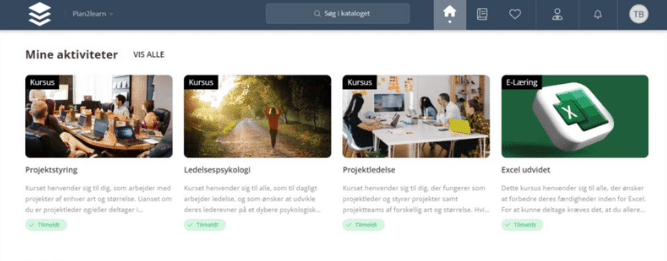
Self-service: the employee does it themselves
In many organisations, the registration process goes like this: the employee asks the manager, the manager asks HR, HR finds the course and registers. Three people to book a seat.
With self-service, the employee enters the course catalog themselves, finds the relevant course and registers. The place is automatically allocated upon registration. If it is sold out, the person is placed on a waiting list, and the place is automatically allocated when it becomes available. No one has to keep an eye on a list.
On their personal page, employees can view upcoming activities, completed courses, and their own course certificates. Confirmations, reminders, and documentation are sent by the system.
Users can also search for courses they can’t find and request that they be created. They will receive a notification when the course becomes available. This also gives you data on what is actually in demand, instead of guesswork for the next year’s course schedule.
You can read More about course administration here.
Automatic user control: the user appears and disappears by themselves
Self-service requires that the user is present in the system with the correct information. This is where the second half comes in.
The Stamdata integration synchronizes the users in Plan2learn with your HR system, payroll system or customer database. Names, email, mobile phone number, job title and organizational affiliation are maintained automatically. The employee does not have to create their profile themselves, and no one has to edit it when the person changes department.
Three things come with it:
- The user is created automatically when the employee is created in the source system
- The user is automatically deactivated when the employee leaves the organisation.
- Single Sign-On means that there is no additional password to manage or reset
Once the master data is in place, target groups can be calculated automatically based on department, job code, education, seniority, and hire date. The new employee thus not only gets a user; they also gets the courses related to the role without anyone having to press a button.
Manual creation of user accounts is more than a time-sucker
The part that most people underestimate is not the creation; it is the closure.
When a user is created manually, it is also closed manually. And the closure is the task that is first forgotten because no one misses an account that is not being used. PwC’s cyberguide Specifically, it recommends having a solid process for removing access so that terminated employees cannot access the systems after the termination of employment, and assigning rights based on a work-related need rather than copying an existing user profile.
In addition to this, there is the personal data page. Data Protection Authority In its guidance on deletion, the Authority notes that information must be deleted on its own initiative when it is no longer necessary to retain it for the purposes for which it was collected. The guidance points out that it may be beneficial to set deletion deadlines. The rules also apply to the information you collect about your employees.
An integration does not solve all the problems for you. But it removes the most common reason why an account remains inactive: that someone has to remember it. You can Read more about security in Plan2learn here.
When self-service isn’t enough
Self-service isn’t suitable for all groups. Some employees don’t sit at a screen every day. Elsewhere, it’s a planner who schedules courses for an entire team.
Here, administration can be delegated instead of being gathered at HR:
- The manager has an overview of the activities of his own employees and can register them directly
- The case management module allows an employee to add and remove other users to multiple activities in a single workflow and take over the system emails regarding the registrations.
The point is not that no one should manage anything. The point is that the management should be as close to the employee as possible, and that HR should not be the middleman in routine tasks.
The calculations you can do today
Esbjerg Municipality’s health and care department spent up to 15 minutes manually registering one user for 15 courses. With approximately 3,000 employees and up to 31 mandatory courses each year, the municipality currently estimates the savings to be between 1,000 and 1,500 hours per year in the department after automating the allocation. Read the full case here.
You don't need to calculate it quite as thoroughly. Just take one number: how many minutes do you spend on average creating and onboarding one new employee, and how many employees did you have last year?
Book one of themhttps://www.plan2learn.dk/book-demo/, Then we look at how much of your current user administration can realistically be automated.